
UniFi PPSK Guide: Consolidate Multiple SSIDs with Private Pre-Shared Keys
Tired of broadcasting multiple WiFi networks for IoT devices? I used UniFi’s Private Pre-Shared Keys (PPSKs) to consolidate four SSIDs down to two - one password per VLAN, same network name. Perfect for managing trusted Matter devices alongside untrusted IoT gadgets without the clutter.
Continuing on my endless quest to perfect my home network, while overbuilding and overcomplicating at every turn, this week I decided to take on the age-old issue of WiFi SSID confusion.
Coming into this project, my UniFi network broadcasted four WiFi names — a main trusted network, a 2.4 GHz on the trusted network for Matter devices, a 2.4 GHz untrusted network for obscure IoT devices, and a guest network for, well, guests. Four networks was too much, especially the two IoT networks.
As a brief aside, Matter really threw things into chaos. Before Matter, all IoT connections were considered untrusted, and isolated on the network. A route was punched from trusted to untrusted for Home Assistant to communicate with them. Matter doesn’t work well with subnet isolation, though. Still, WiFi Matter devices prefer the 2.4 GHz channels, and wouldn’t always play nice with the dual 2.4 GHz and 5 GHz channels. Hence, the creation of the second, “trusted”, IoT SSID.
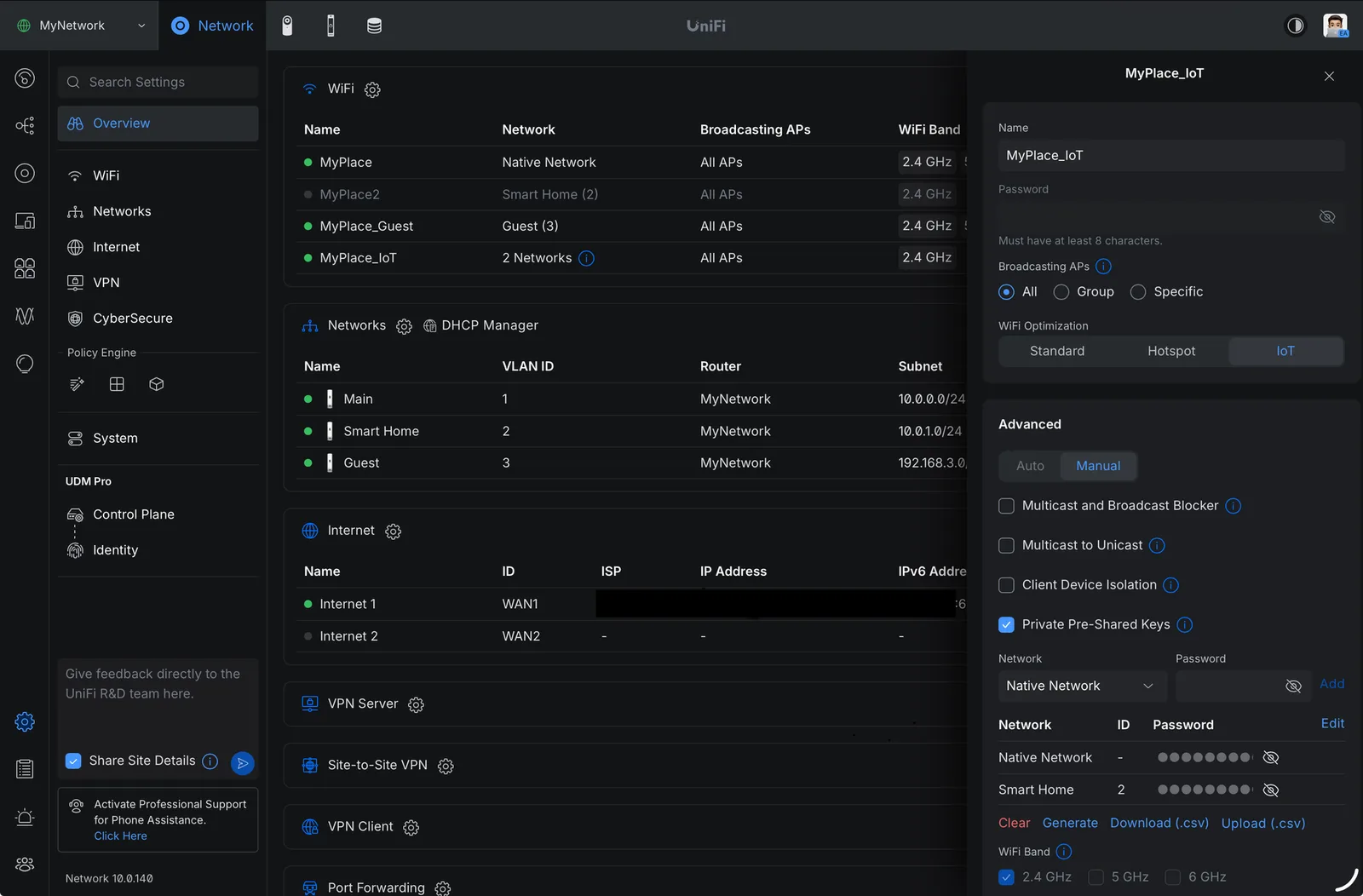
A screenshot of the UniFi Network console showing the WiFi setup
Back to this week’s fun — enter Private Pre-Shared Keys (PPSKs). PPSKs enable each SSID to have multiple “passwords” (pre-shared keys), and allow each PPSK to map to a specific subnet/VLAN. So, for example, I can have a single network named MyIoT, with two PPSKs. One PPSK, when used to join devices to the WiFi, will add the devices to the untrusted network, while the other, will add them to the trusted network. You can create many PPSKs, giving you an easy way to protect your network from device manufacturers you really don’t trust. For example, you could use a new key for each cheap WiFi-connected kitchen appliance you buy.
Once set up, I was able to cut out the two IoT networks in favor of a single one, with two PPSKs; one for trusted/Matter devices and another for untrusted devices. In the UniFi console, it’s easy to see which device is connected to which WiFi network and VLAN. It’s cleaned up the noisy SSID broadcasting, and given me an easy way to further protect the network by creating new PPSKs without interrupting the devices already connected.
Now to share a limitation of UniFi’s approach to PPSKs; presently, they only support WPA2. I’d love to deploy PPSKs on my main, trusted WiFi as well, but I’m not willing to sacrifice WPA3’s security and quality-of-life features for the network my family uses on their newest devices.
Is this setup overkill for a home network? Most certainly. Was it fun to deploy PPSKs and eliminate an advertised WiFi network along the way? You bet!
Comments
p.s. · Have something to add? Sign in with GitHub to share it. Threads live in GitHub Discussions.